Practical Application Security for Developers - Part 2: Public Key Cryptography and Certificates
Learn RSA, ECC, digital signatures, X.509 certificates, and practical certificate handling for modern applications.
In Part 1 we covered symmetric primitives like hashing, HMAC, and AES. Those work well when both parties already share a secret. The harder question is this: how do two systems that have never talked before establish trust safely over an untrusted network?
That is the key distribution problem, and public key cryptography is the reason HTTPS, code signing, and certificate-based trust can work at internet scale.
This article covers:
- How asymmetric key pairs work
- RSA versus elliptic-curve cryptography
- Digital signatures and when they matter more than encryption
- X.509 certificates and trust chains
- A practical local CA setup for development
The Core Idea: Asymmetric Key Pairs
Symmetric encryption uses one secret for both encryption and decryption. Asymmetric cryptography splits that responsibility across a key pair known as public and private keys.
A private and public key are a mathematically linked pair where each one only works with the other. For example, data encrypted with the public key can only be decrypted with the private key, and data signed with the private key can be verified with the public key.
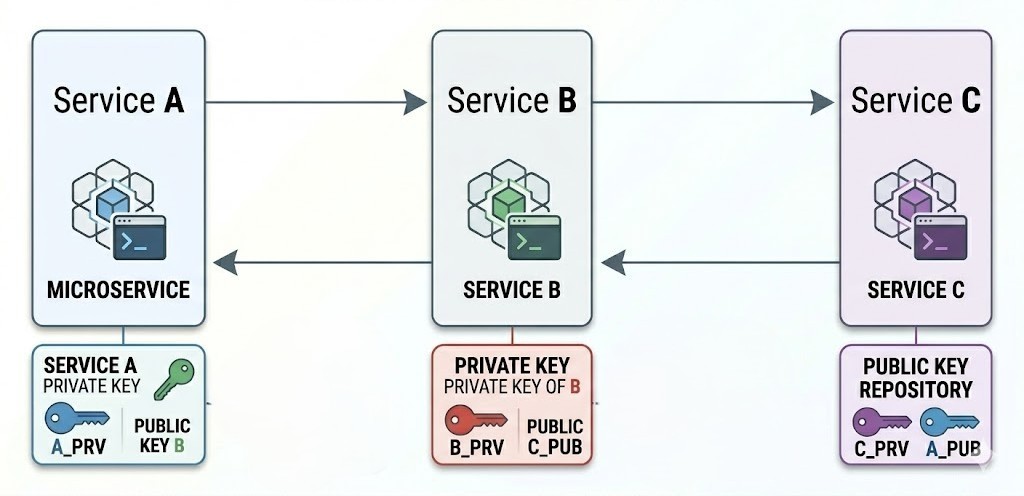
In the private-public key pair, the private key is used for most critical part of the operation.
| Key | Who holds it | What it does |
|---|---|---|
| Public key | Anyone | Encrypts data or verifies signatures |
| Private key | Only the owner | Decrypts data or creates signatures |
   CLIENT SIDE                          SERVER SIDE

   Public Key                           Private Key
   (shareable)                          (secret)

        │                                   │
        ▼                                   ▼
   Encrypt Data                      Decrypt Data
   Verify Signature                  Create Signature
The important consequence is that you can publish the public key without exposing the private key. That breaks the circular dependency that symmetric systems have: you no longer need a secure channel before you can create a secure channel.
There are two most commonly used public key cryptography systems:
- RSA
- Elliptic Curves
RSA
RSA is based on the difficulty of factoring very large integers. It remains widely supported and still appears in many production systems, although new systems increasingly prefer elliptic-curve algorithms.
Practical RSA Choices
| Parameter | Recommendation | Why |
|---|---|---|
| Key size | 2048-bit minimum, 4096-bit for long-lived keys | 1024-bit is no longer acceptable |
| Encryption padding | OAEP | Safer than PKCS#1 v1.5 |
| Signature padding | PSS when possible | Stronger modern RSA signature mode |
Why RSA Is Usually Used in Hybrid Form
RSA is much slower than AES for bulk data. In practice, systems usually do this instead:
- Generate a random AES key
- Encrypt the real payload with AES-GCM
- Encrypt the AES key with the recipient's RSA public key
- Send both together
That is why RSA is often used for key wrapping while AES handles the real data.
Digital Signatures
Encryption answers, "Can only the intended recipient read this?" Digital signatures answer a different question: "Can I prove who produced this data and whether it was modified later?"
Signing Flow
- Hash the message
- Sign that hash with the private key
- Send the message and signature together
Verification Flow
- Hash the received message
- Verify the signature with the public key
- Reject the data if verification fails
This matters for:
- JWTs signed with asymmetric keys
- Code-signing pipelines
- Certificates in TLS
- Signed documents and artifacts
HMAC versus Digital Signatures
| Property | HMAC | Digital signature |
|---|---|---|
| Key model | Shared secret | Public/private key pair |
| Non-repudiation | No | Yes |
| Performance | Very fast | Slower |
| Best fit | Internal trust boundary | Third-party verification and PKI |
RSA Signing in Java
import java.security.KeyPair;
import java.security.KeyPairGenerator;
import java.security.PrivateKey;
import java.security.PublicKey;
import java.security.SecureRandom;
import java.security.Signature;

public class RsaSignatureUtil {

    public static KeyPair generateKeyPair() throws Exception {
        KeyPairGenerator generator = KeyPairGenerator.getInstance("RSA");
        generator.initialize(4096, new SecureRandom());
        return generator.generateKeyPair();
    }

    public static byte[] sign(PrivateKey privateKey, byte[] data) throws Exception {
        Signature signature = Signature.getInstance("SHA256withRSA");
        signature.initSign(privateKey);
        signature.update(data);
        return signature.sign();
    }

    public static boolean verify(PublicKey publicKey, byte[] data, byte[] signed)
            throws Exception {
        Signature signature = Signature.getInstance("SHA256withRSA");
        signature.initVerify(publicKey);
        signature.update(data);
        return signature.verify(signed);
    }
}
Elliptic Curve Cryptography
RSA is familiar, but ECC gives equivalent security with much smaller keys.
| Security level | RSA key size | ECC key size |
|---|---|---|
| 128-bit | 3072-bit | 256-bit |
| 192-bit | 7680-bit | 384-bit |
| 256-bit | 15360-bit | 521-bit |
Why Teams Prefer ECC in New Systems
- Smaller certificates and keys
- Faster handshakes
- Lower CPU cost at scale
- Better fit for mobile and high-volume APIs
Curves You Will Actually See
| Curve | Typical use |
|---|---|
| P-256 | TLS certificates, ES256 JWTs |
| P-384 | Higher-security environments |
| Ed25519 | SSH keys, modern signing |
| X25519 | Key exchange, especially TLS 1.3 |
ECC Signing in Java
import java.security.KeyPair;
import java.security.KeyPairGenerator;
import java.security.PrivateKey;
import java.security.PublicKey;
import java.security.Signature;

public class EcdsaSignatureUtil {

    public static KeyPair generateKeyPair() throws Exception {
        KeyPairGenerator generator = KeyPairGenerator.getInstance("EC");
        generator.initialize(256);
        return generator.generateKeyPair();
    }

    public static byte[] sign(PrivateKey privateKey, byte[] data) throws Exception {
        Signature signature = Signature.getInstance("SHA256withECDSA");
        signature.initSign(privateKey);
        signature.update(data);
        return signature.sign();
    }

    public static boolean verify(PublicKey publicKey, byte[] data, byte[] signed)
            throws Exception {
        Signature signature = Signature.getInstance("SHA256withECDSA");
        signature.initVerify(publicKey);
        signature.update(data);
        return signature.verify(signed);
    }
}
X.509 Certificates
Public keys alone are not enough. A client still needs to know whether the key it received really belongs to the identity it claims to represent. X.509 certificates solve that by binding a public key to an identity and having a trusted certificate authority sign that binding.
Certificate lifecycle
The Core Fields
| Field | Purpose |
|---|---|
| Subject | Who the certificate belongs to |
| Issuer | Which CA signed it |
| Validity | When the certificate is valid |
| Public key | The certified key material |
| SAN | DNS names or IPs the cert covers |
| Signature | Proof from the issuer |
Client Trust Store
        │
        ▼
   [ Root CA ]
        │
        ▼
[ Intermediate CA ]
        │
        ▼
[ Server Certificate ]

Verification succeeds if the chain terminates at a trusted root.
Helpful OpenSSL Commands
# Download a remote certificate
echo | openssl s_client -servername github.com -connect github.com:443 2>/dev/null \
    | openssl x509 > github-cert.pem

# Inspect certificate contents
openssl x509 -in github-cert.pem -noout -text

# View just subject and issuer
openssl x509 -in github-cert.pem -noout -subject -issuer

# Check dates
openssl x509 -in github-cert.pem -noout -dates

# Extract the public key
openssl x509 -in github-cert.pem -noout -pubkey
Certificate Format Cheat Sheet
| Format | Extension | Typical use |
|---|---|---|
| PEM | .pem, .crt | Human-readable certificate and key files |
| DER | .der, .cer | Raw binary certificate |
| PKCS#12 | .p12, .pfx | Certificate plus private key bundle |
| JKS | .jks | Legacy Java keystore format |
Verifying Certificate Authenticity
Trust usually flows through a chain:
- Your server certificate is signed by an intermediate CA
- That intermediate is signed by a root CA
- Your OS, browser, or JVM already trusts that root CA
openssl verify github-cert.pemIf verification fails because the issuer is missing, provide the intermediate explicitly:
openssl verify -CAfile intermediate-ca.pem github-cert.pemHow CAs Verify You Own a Domain
Before a public CA issues a certificate, it needs proof you control the domain. There are three standard methods:
- Email — the CA sends a verification link to an administrative address on the domain (e.g.
admin@example.com). Simple but manual. - HTTP-01 — the CA gives you a token file to serve at
http://yourdomain/.well-known/auth-challenge/<token>. The CA fetches it to confirm you control the web server. This is what Let's Encrypt's Certbot automates. - DNS-01 — the CA gives you a TXT record value to add to your domain's DNS config. The CA queries DNS to verify it. The only method that works for wildcard certificates (
*.example.com).
Let's Encrypt is a free, non-profit CA that automates the entire HTTP-01 and DNS-01 flow — worth knowing about before paying for certificates.
What Happens When a Private Key Is Compromised
If a certificate's private key is stolen or accidentally exposed, the certificate owner asks the CA to revoke it. The CA adds it to a Certificate Revocation List (CRL) or responds to OCSP queries so that browsers and clients know to reject it before the certificate's natural expiry date. This is why committing private keys to source control is in the mistakes section — revocation is reactive, not instant.
Build a Local Development CA
A local CA gives you trusted HTTPS in development without training yourself to ignore browser warnings.
1. Create the CA
openssl genpkey -algorithm RSA -pkeyopt rsa_keygen_bits:4096 -out ca/ca_key.pem
openssl req -x509 -new -key ca/ca_key.pem -days 3650 \
  -out ca/ca_cert.pem -subj "/CN=Local Dev CA"
2. Install It in the Trust Store
macOS
sudo security add-trusted-cert -d -r trustRoot \
  -k "/Library/Keychains/System.keychain" ca/ca_cert.pem
Ubuntu or Debian
sudo cp ca/ca_cert.pem /usr/local/share/ca-certificates/local-dev-ca.crt
sudo update-ca-certificates
Windows PowerShell
Import-Certificate -FilePath ca\ca_cert.pem -CertStoreLocation Cert:\LocalMachine\Root3. Create and Sign a Server Certificate
First, create ca/server-cert.cnf:
[ req ]
prompt             = no
default_md         = sha256
distinguished_name = req_dn
req_extensions     = req_ext

[ req_dn ]
CN = localhost

[ req_ext ]
subjectAltName     = @alt_names
basicConstraints   = CA:FALSE
keyUsage           = critical, digitalSignature, keyEncipherment
extendedKeyUsage   = serverAuth

[ alt_names ]
DNS.1 = localhost
IP.1  = 127.0.0.1
IP.2  = ::1
Then generate the server key, CSR, and signed certificate:
# Generate server key
openssl genpkey -algorithm RSA -pkeyopt rsa_keygen_bits:2048 -out server_key.pem

# Generate CSR using config
openssl req -new -key server_key.pem -out server.csr -config ca/server-cert.cnf

# Sign with SAN extensions included
openssl x509 -req \
  -in server.csr \
  -CA ca/ca_cert.pem \
  -CAkey ca/ca_key.pem \
  -CAcreateserial \
  -out server_cert.pem \
  -days 365 \
  -sha256 \
  -extensions req_ext \
  -extfile ca/server-cert.cnf
4. Verify It
openssl verify -CAfile ca/ca_cert.pem server_cert.pemCommon Mistakes to Avoid
- Using RSA 1024-bit keys
- Using old padding modes when OAEP or PSS are available
- Forgetting SANs and relying on CN alone
- Committing private keys to source control
- Disabling certificate verification in production
- Treating expiry monitoring as optional
Summary
| Topic | Takeaway |
|---|---|
| Asymmetric keys | Solve the key-distribution problem |
| RSA | Still useful, but heavier |
| ECC | Better default for many new systems |
| Digital signatures | Prove origin and integrity |
| X.509 | Binds keys to identity through a trust chain |
| Local CA | Makes development TLS much safer and less annoying |
What's Next
In Part 3, we will put these keys and certificates to work in the real world: TLS 1.3, mTLS, ingress termination, and production hardening for Spring Boot and Kubernetes.
Did you find this article useful?