Practical Application Security for Developers - Part 5: OAuth 2.0, OpenID Connect, and SSO
Understand OAuth 2.0, OpenID Connect, PKCE, refresh tokens, SSO, and what secure login flows require in practice.
In Part 4 we looked at how identity is represented inside tokens using JOSE, JWS, JWE, and JWK. This part answers the next question: how do users and applications get those tokens in the first place?
That question is where teams often get into trouble. OAuth 2.0 is frequently described as "authentication," even though its original job is authorization. OpenID Connect then adds the identity layer on top. If you mix the two carelessly, you end up with logins that appear to work but are missing important security guarantees.
This article focuses on the flows and decisions backend developers actually need:
- How SSO works in real systems
- OAuth 2.0 actors and authorization flows
- When to use Authorization Code + PKCE
- When Client Credentials is appropriate
- How tokens (access, ID, refresh) differ
- How validation, logout, and multitenancy work in practice
What SSO Actually Solves
Single Sign-On means a user authenticates once with a trusted identity provider and can then access multiple related applications without repeatedly entering credentials.
For users, that feels like convenience. For engineering teams, it solves bigger problems:
- Centralised authentication (MFA, password policy)
- Centralised identity lifecycle management
- Reduced duplication of login/session logic across apps
- Consistent audit and security logging
Imagine a company with four internal applications: payroll, HR, expense management, and engineering support tools. Without SSO, every app needs its own login screen, its own password reset flow, and its own session logic. With SSO, those apps trust a shared identity provider like Keycloak, Okta, Entra ID, or Auth0.
That is the architectural shift: applications stop authenticating users directly and start trusting identity assertions from an identity provider.
The Four Actors You Need to Keep Straight
Most confusion in OAuth and OIDC comes from mixing up the participants.
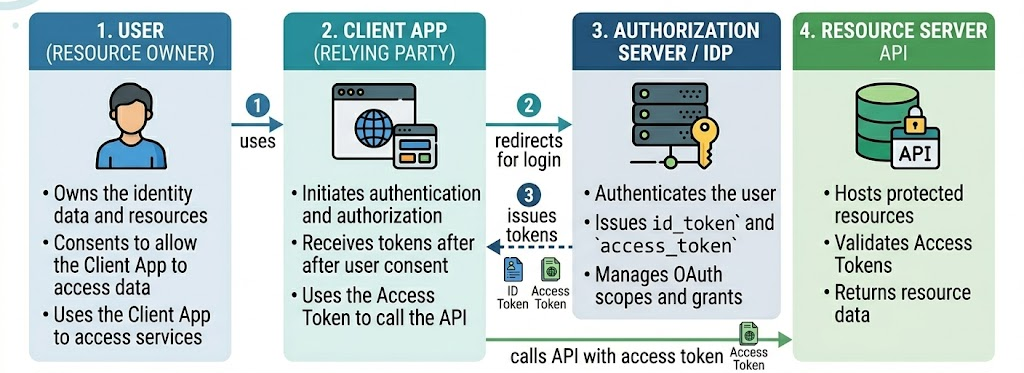
| Actor | What it is | Example |
|---|---|---|
| User | The human trying to access something | An employee opening the expense portal |
| Client | The app the user interacts with | SPA, mobile app, server-rendered web app |
| Authorization Server / IdP | The system that authenticates users and issues tokens | Keycloak, Okta, Auth0 |
| Resource Server | The API or backend that protects data | Expense API, orders API |
If you hold these four roles clearly in your head, the rest of the protocol becomes much easier to follow.
OAuth 2.0 vs OpenID Connect
This distinction matters more than most tutorials admit.
| Protocol | Primary purpose | Main artifact |
|---|---|---|
| OAuth 2.0 | Delegated authorization | Access token |
| OpenID Connect | Authentication and identity | ID token + UserInfo |
OAuth 2.0 answers:
- Can this client call the API?
- On whose behalf is it acting?
- What scopes were granted?
OpenID Connect answers:
- Who is the user?
- When did they authenticate?
- Which identity provider vouches for them?
Simple rule: If you need login, use OpenID Connect. If you need delegated API access, use OAuth 2.0. In practice, most user sign-in systems use both together.
Authorization Code Flow: The Default for User Login
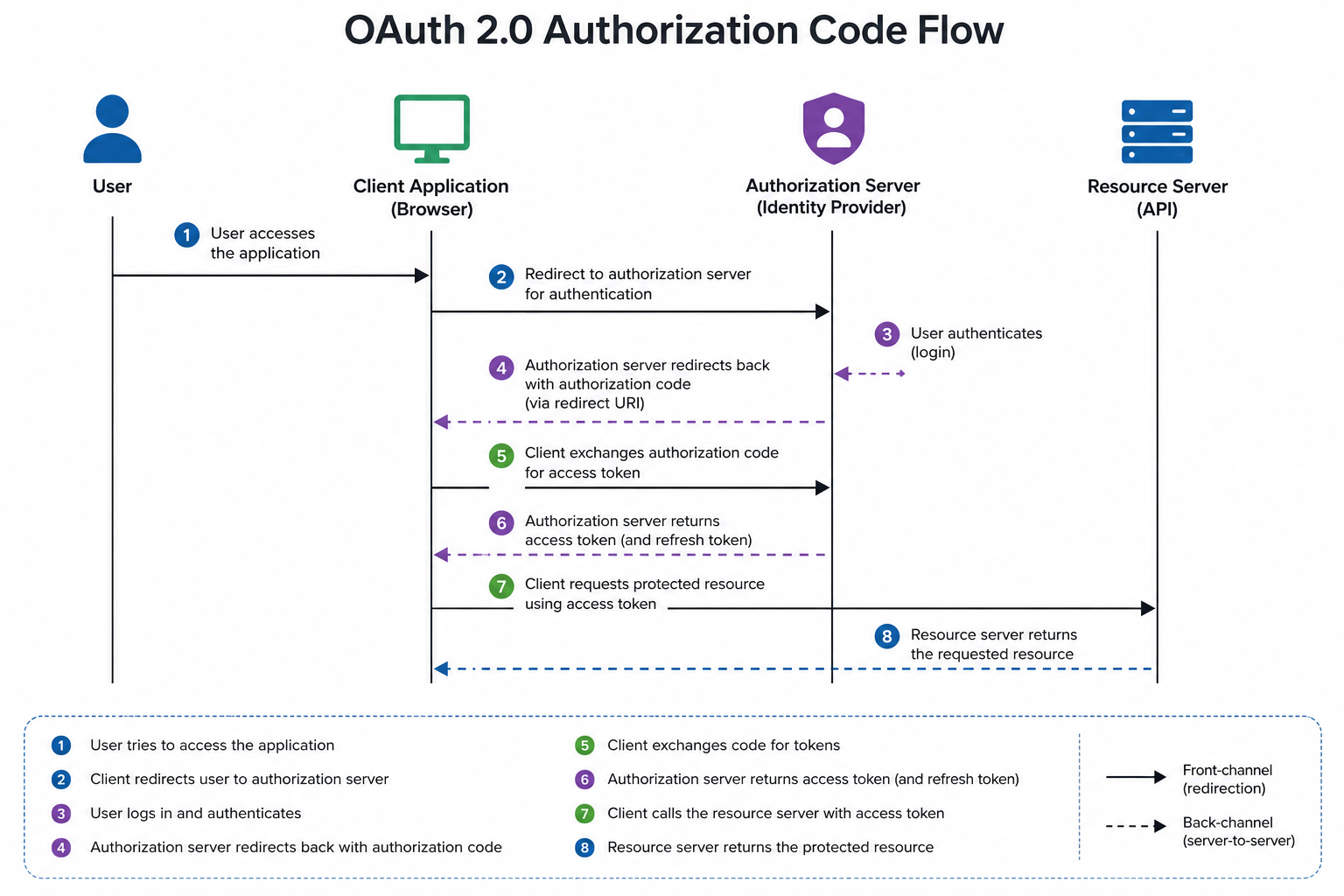
For browser-based applications and server-side web apps, the Authorization Code flow is the modern default.
What Happens
- The user tries to access the client app
- The client redirects them to the identity provider
- The user authenticates there
- The identity provider redirects back with a short-lived authorization code
- The client exchanges that code for tokens
- The client uses the access token to call APIs
Why This Flow Exists
The important detail is that the browser does not receive an access token directly from the login redirect. It only receives a short-lived code. The code is then exchanged securely at the token endpoint.
That design reduces token exposure in browser history, logs, and referer leakage.
Practical Mental Model
Think of the authorization code as a claim ticket at a secure counter. The browser carries the ticket, but the sensitive item is retrieved later through a more controlled server-to-server step.
PKCE (Proof Key for Code Exchange)
Authorization Code by itself is not enough for public clients like SPAs and mobile apps. Those clients cannot safely protect a long-term client secret.
That is why PKCE exists.
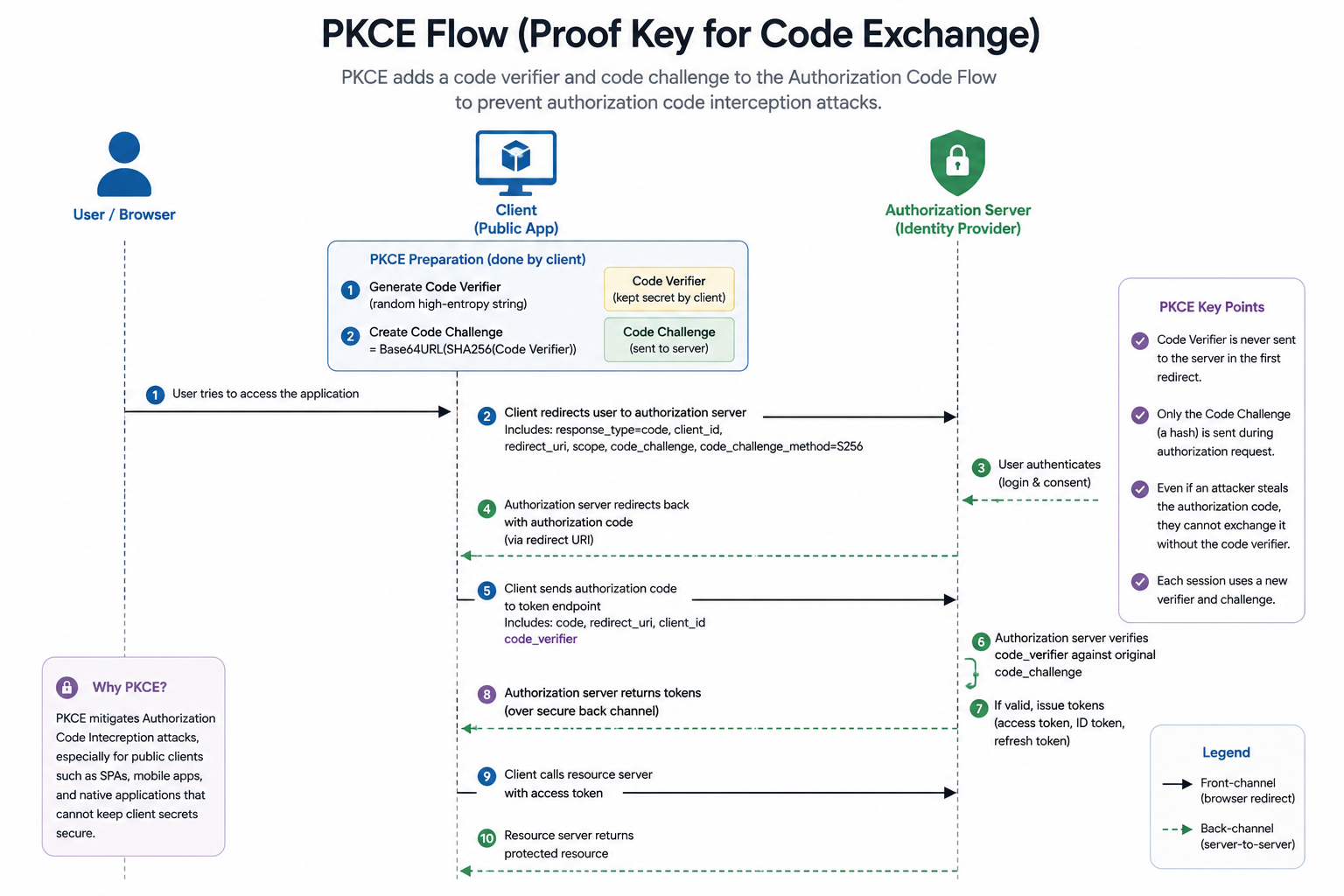
What PKCE Adds
Before redirecting the user, the client generates:
- A random code verifier
- A hashed code challenge derived from that verifier
The client sends the challenge during the authorization request and later proves possession of the original verifier during the code exchange.
If an attacker steals the authorization code but does not have the verifier, the code exchange fails.
PKCE Flow
| Step | What happens |
|---|---|
| 1 | Client generates a high-entropy verifier |
| 2 | Client derives a challenge using SHA-256 |
| 3 | Client sends the challenge to the IdP |
| 4 | IdP returns authorization code |
| 5 | Client sends code + original verifier to token endpoint |
| 6 | IdP checks verifier against the stored challenge |
Java Utility for PKCE
import java.nio.charset.StandardCharsets;
import java.security.MessageDigest;
import java.security.SecureRandom;
import java.util.Base64;

public class PkceUtil {

    public static String generateVerifier() {
        byte[] bytes = new byte[32];
        new SecureRandom().nextBytes(bytes);
        return Base64.getUrlEncoder().withoutPadding().encodeToString(bytes);
    }

    public static String generateChallenge(String verifier) throws Exception {
        byte[] digest = MessageDigest.getInstance("SHA-256")
                .digest(verifier.getBytes(StandardCharsets.US_ASCII));
        return Base64.getUrlEncoder().withoutPadding().encodeToString(digest);
    }
}
Current best practice: Treat PKCE as mandatory for public clients. In many environments, it is also worth enabling for confidential clients for defense in depth.
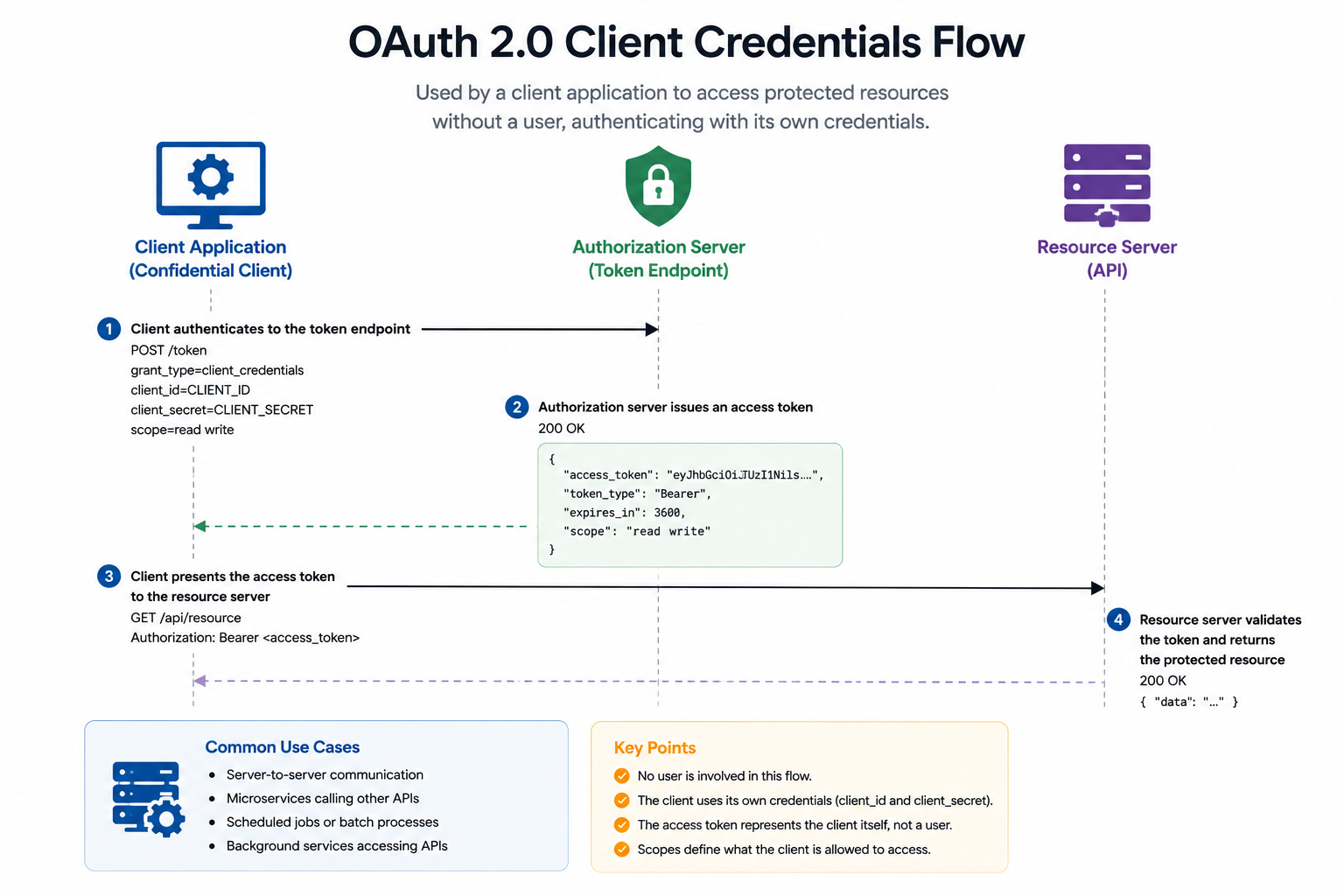
Client Credentials Flow: Service Identity, Not User Identity
Not every token is about a user. Sometimes one backend service simply needs to call another backend service.
That is where Client Credentials fits.
When to Use It
- Scheduled jobs calling internal APIs
- Batch processors publishing data
- Backend-to-backend integrations
- Service accounts used by automation
When Not to Use It
- Browser logins
- Mobile app sign-in
- Any scenario where you need to represent a real user identity
Flow Summary
- The client authenticates itself to the token endpoint
- The authorization server issues an access token
- The client presents that token to the resource server
No browser redirect. No user session. No consent screen for a human.
Spring Configuration Example
spring:
  security:
    oauth2:
      client:
        registration:
          billing-client:
            client-id: billing-service
            client-secret: ${BILLING_CLIENT_SECRET}
            authorization-grant-type: client_credentials
            scope: invoices.write
        provider:
          company-idp:
            token-uri: https://id.example.com/oauth2/token
Important Boundary
A Client Credentials token says "this service is calling you." It does not say "user Alice approved this action." If you need end-user context, propagate user identity through token exchange or delegated flows instead of silently switching to service identity.
Access Tokens, ID Tokens, and Refresh Tokens
These tokens are often lumped together, but they serve different purposes.
| Token | Purpose | Typical consumer |
|---|---|---|
| Access token | Authorizes API access | Resource server |
| ID token | Conveys authentication result and user identity | Client application |
| Refresh token | Gets new access tokens without forcing re-login | Trusted client |
Access Token
This is the credential your API cares about. It should usually be short-lived, audience-bound, and scoped.
ID Token
This is for the client, not for calling arbitrary APIs. It tells the client who authenticated and under what conditions.
Example claims often include:
sub- subject identifieriss- issueraud- client IDiatandexp- token timesauth_time- when the user authenticated
Refresh Token
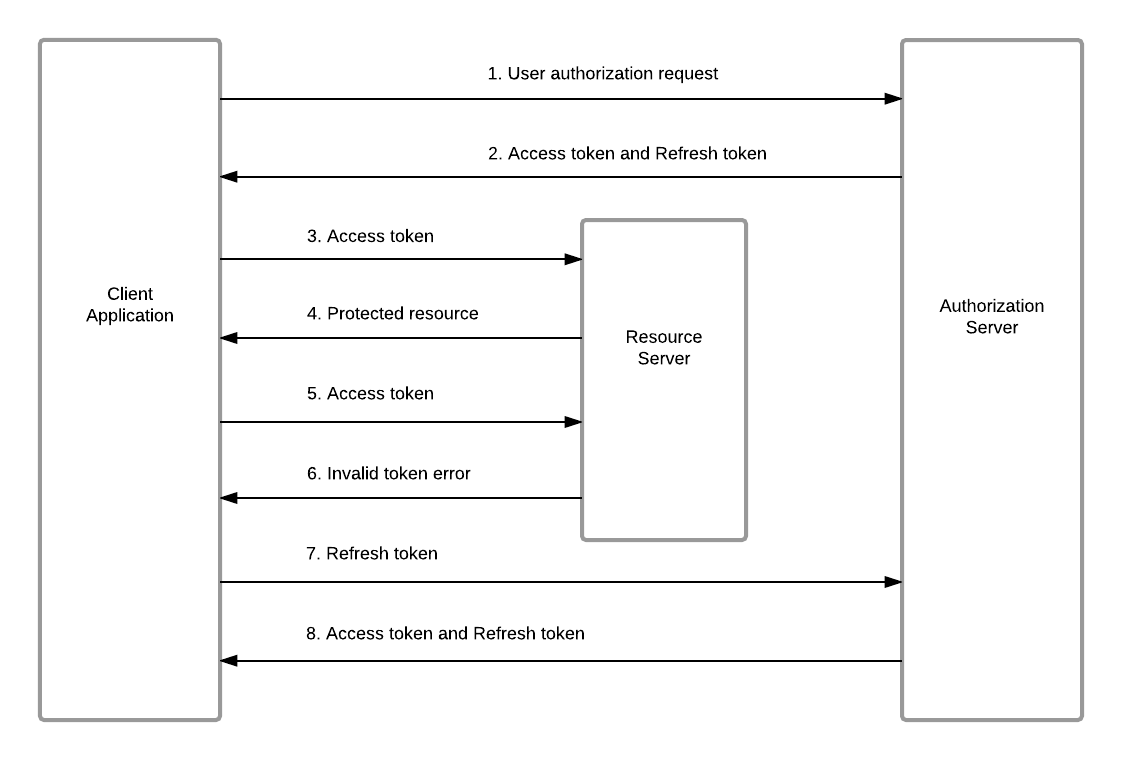
Refresh tokens improve UX by avoiding constant reauthentication, but they are high-value credentials. If stolen, they can be used to mint new access tokens repeatedly.
That means they deserve tighter controls than access tokens.
Refresh Token Security That Actually Matters
If your client receives refresh tokens, you should think beyond "store and reuse." The real questions are about theft detection and blast radius.
Good Practices
- Store them securely - encrypted at rest, never in browser localStorage for SPAs
- Use rotation - every refresh returns a new refresh token and invalidates the old one
- Revoke on suspicion - abnormal geography, device change, or replay attempt
- Scope them tightly - only issue them to trusted client types
- Bind where possible - sender-constrained tokens are stronger than bearer tokens
Example Token Response
{
  "access_token": "eyJhbGciOiJSUzI1NiIsImtpZCI6IjIwMjYtMDUtMDEifQ...",
  "refresh_token": "def50200b55d6f...",
  "id_token": "eyJhbGciOiJFUzI1NiIsImtpZCI6ImlkcC1rZXktMiJ9...",
  "token_type": "Bearer",
  "scope": "openid profile orders.read",
  "expires_in": 300
}
What OpenID Connect Adds on Top of OAuth 2.0
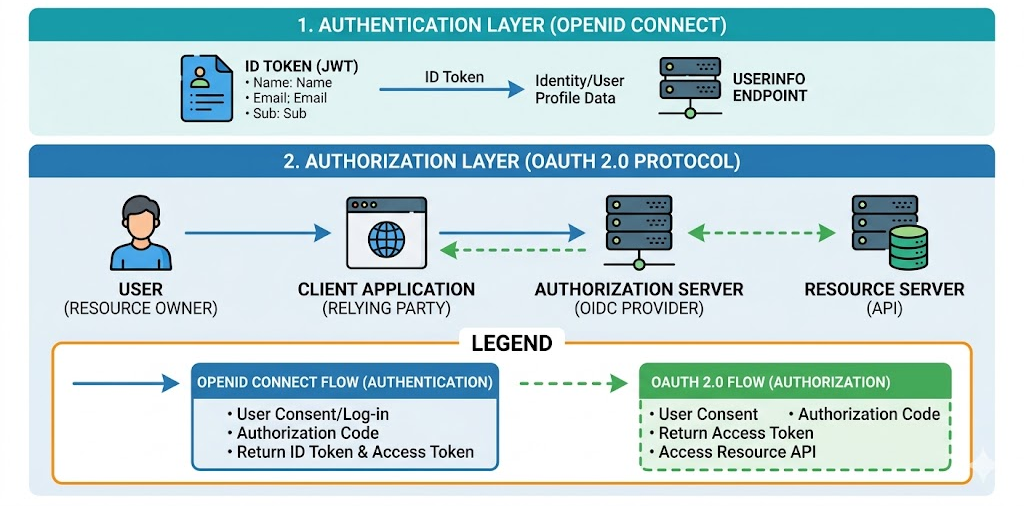
Without OIDC, an OAuth client might receive an access token but still lack a standardized way to know who the user is. OIDC fills that gap. OIDC enhances OAuth2 by introducing an additional token, known as the ID token, alongside the access token. The ID token’s primary purpose is authentication.
Key Additions from OIDC
| Feature | Why it matters |
|---|---|
| ID token | Standard identity assertion for the client |
| UserInfo endpoint | Additional profile data on demand |
| Nonce | Replay protection in browser flows |
| Standard claims | Interoperable identity fields like email, name, sub |
| Logout/session standards | Coordinated sign-out behavior |
The sub Claim Is the Stable Identifier
Developers often reach for email as the primary key. That is a mistake in many identity systems. Email can change. The OIDC sub claim is designed to be the stable user identifier for that issuer.
Recommendation: Use
subfor internal identity mapping. Treat email as profile data, not the primary identity key.
Validating ID Tokens Correctly
The ID token is not valid just because it parses and has a signature.
The client should validate at least:
- Issuer - did the expected IdP mint it?
- Audience - is the token meant for this client?
- Expiration - is it still valid?
- Nonce - does it match the original login request in browser flows?
- Signature - does the issuer key verify it?
Spring Boot Resource Server Validation
spring:
  security:
    oauth2:
      resourceserver:
        jwt:
          issuer-uri: https://id.example.com/realms/company
This lets Spring Security discover metadata and JWKS from the issuer and validate incoming JWT access tokens automatically.
If you need audience validation too, add it explicitly instead of assuming the framework will infer your intended API audience.
import org.springframework.context.annotation.Bean;
import org.springframework.security.oauth2.core.OAuth2TokenValidator;
import org.springframework.security.oauth2.jwt.Jwt;
import org.springframework.security.oauth2.jwt.JwtClaimValidator;

@Bean
OAuth2TokenValidator<Jwt> audienceValidator() {
    return new JwtClaimValidator<java.util.List<String>>(
            "aud",
            audiences -> audiences != null && audiences.contains("orders-api")
    );
}
Session Management and Logout
Users experience SSO most clearly at logout time. They assume that logging out of one app means the broader session is also finished. That is not always true unless you design for it.
Common Patterns
| Pattern | What it does |
|---|---|
| Local logout | Ends only the app session |
| RP-initiated logout | App redirects the user to the IdP logout endpoint |
| Single Logout | Multiple relying parties end sessions together |
| Silent reauthentication | Checks existing session without interrupting the user |
Practical Advice
- Be explicit about what "logout" means in your app
- Clear local session state and tokens immediately
- If you rely on IdP session logout, test it across all participating apps
- Do not assume browser tab closure equals logout
Multitenancy in OIDC
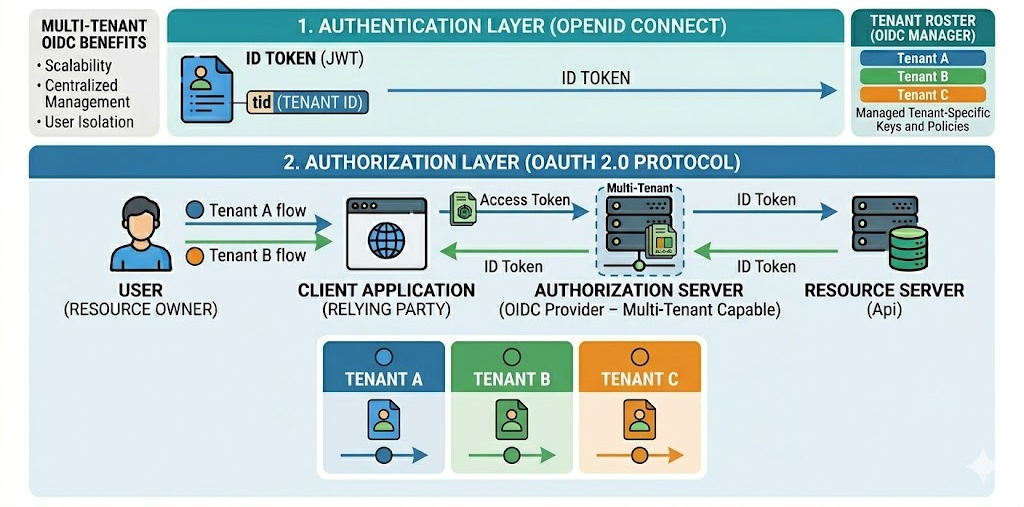
Multitenancy becomes tricky when one identity platform serves multiple customers, organizations, or business units.
What Changes in Multi-Tenant Systems
- Different issuers or realms per tenant
- Different redirect URIs and branding
- Different role mappings and group rules
- Different client IDs and consent rules
Practical Design Choices
| Model | Trade-off |
|---|---|
| Separate realm / tenant per customer | Strong isolation, more operational overhead |
| Shared realm with tenant claim | Simpler operations, stricter app-side authorization needed |
| Per-tenant client registrations | Good separation at client level, more config management |
If your system is multi-tenant, make tenant context explicit in both authentication and authorization. A valid login is not enough if the user is valid for the wrong tenant.
Common Mistakes in OAuth and OIDC Implementations
-
Using OAuth without understanding whether you need identity or authorization - If you need login, add OIDC.
-
Skipping PKCE for SPAs and mobile apps - This is one of the most preventable mistakes in public-client security.
-
Sending ID tokens to APIs as though they were access tokens - ID tokens are for the client; APIs should expect access tokens.
-
Failing to validate audience - A token intended for another application should not be accepted.
-
Treating refresh tokens casually - They are long-lived credentials, not just session convenience artifacts.
-
Confusing service identity with user identity - Client Credentials tokens do not represent end-user approval.
-
Using email as immutable identity - Use
subinstead.
Quick Decision Guide
| Scenario | Recommendation |
|---|---|
| Browser or server-side user login | Authorization Code + OIDC |
| SPA or mobile app | Authorization Code + PKCE + OIDC |
| Backend job calling API | Client Credentials |
| Need user profile info in a standard way | OIDC ID token + UserInfo |
| Need long-lived user session without constant re-login | Refresh tokens with rotation |
| Multi-app company portal | Central IdP + SSO session management |
What's Next
SSO solves how users authenticate across applications, but many modern systems are also moving away from passwords entirely.
In Part 6, we will cover passwordless authentication - magic links, OTPs, passkeys, WebAuthn, and how to choose the right experience for real users without opening obvious attack paths.
Did you find this article useful?