Practical Application Security for Developers - Part 6: Passwordless Login
Compare magic links, OTP, passkeys, and WebAuthn with practical implementation guidance for passwordless login.
In Part 5 we covered SSO, OAuth 2.0, and OpenID Connect. Those protocols tell us how identity moves between applications, but they do not force us to keep using passwords as the front door.
That matters because passwords remain one of the weakest links in modern systems. Users reuse them, phishers steal them, bots spray them, and support teams burn hours resetting them. Passwordless login is attractive not because it is trendy, but because it removes a credential humans handle badly.
This article looks at the passwordless approaches developers are most likely to implement:
- Magic links
- One-time passwords (OTP)
- WebAuthn and passkeys
- When each option works well
- The implementation details that separate usable systems from insecure ones
What Passwordless Really Means
Passwordless does not mean "less security." It means the user proves identity through a different factor:
- Something they have: phone, email inbox, security key
- Something they are: biometric unlock on a trusted device
- A cryptographic key pair stored by the authenticator
The big shift is that your system stops relying on a long-lived shared secret typed by a human.
That changes the threat model. You reduce password reuse and credential stuffing, but you still need to think about:
- Account recovery
- Device loss
- Email compromise
- SMS interception
- Replay prevention
- Session hardening after login
A Practical Decision Framework
Not every passwordless option fits every product.
| Method | Best for | Main risk |
|---|---|---|
| Magic links | Low-friction consumer login | Email inbox becomes the real credential |
| Email or SMS OTP | Simple verification and step-up auth | Phishing, SIM swap, delivery delays |
| Authenticator-app OTP | MFA and stronger possession checks | User setup friction |
| Passkeys / WebAuthn | High-security, low-phishing login | Recovery and device portability planning |
Rule of thumb: If you want the strongest phishing resistance, use passkeys. If you want the fastest rollout for a consumer product, start with magic links or email OTP, but do not pretend they are equivalent to WebAuthn.
Magic Links: Frictionless, but Only as Secure as Email
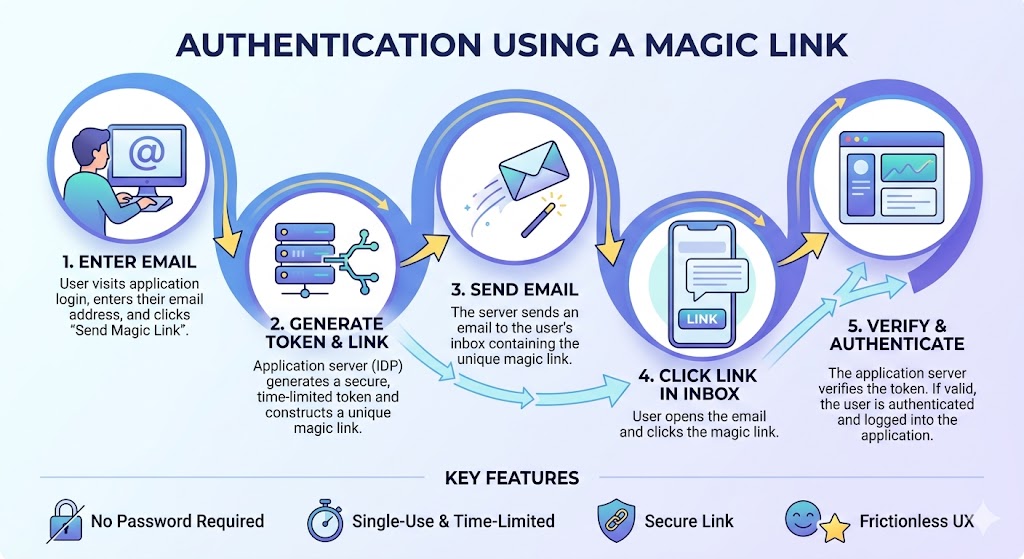
Magic links are popular because they remove almost all user effort. A person enters an email address, your application sends a time-limited link, and clicking it completes login.
That works well for:
- B2C products where convenience is critical
- Occasional-use apps where users forget passwords
- Early-stage SaaS products trying to reduce sign-up abandonment
How the Flow Works
- User submits email address
- Server generates a one-time login token
- Server stores or hashes metadata for later validation
- Server emails a short-lived login URL
- User clicks the link
- Server verifies token, checks expiry and one-time-use state, then creates a session
Important Security Detail: Hide Account Existence
The response should be the same whether or not the email exists.
If an account exists, we have sent a sign-in link.That prevents email enumeration attacks, where attackers probe your login form to discover valid user accounts.
Token Design
The token should be:
- High-entropy and unpredictable
- Short-lived, typically 5 to 15 minutes
- Single-use
- Bound to a login intent in your database or cache
Safer Storage Pattern
Do not store raw magic-link tokens if you can avoid it. Store a hash and compare hashes on receipt, the same way you would avoid storing raw API secrets.
Example Login URL
https://example.com/auth/magic?token=7b2f3ef5f9c5404fb8f2d3fd8e42f8f6...Java Example: Token Issue Service
import java.security.SecureRandom;
import java.util.Base64;

public class MagicLinkTokenService {

    public static String generateToken() {
        byte[] bytes = new byte[32];
        new SecureRandom().nextBytes(bytes);
        return Base64.getUrlEncoder().withoutPadding().encodeToString(bytes);
    }
}
What to Store Per Request
| Field | Why |
|---|---|
| User ID or email | Map token to account |
| Token hash | Avoid storing raw token |
| Expiration time | Enforce short validity |
| Used flag / consumed timestamp | Enforce one-time use |
| Request metadata | Throttle and investigate abuse |
Magic Link Mistakes to Avoid
- Stateless reusable links - If you do not track use, replay becomes possible.
- Long-lived links - A 24-hour login link is an account takeover opportunity.
- Logging the full URL - The token in the query string is a credential.
- No rate limiting - Attackers can flood inboxes or test many accounts.
OTP Login: Familiar, Flexible, and Easy to Misjudge
One-time passwords are everywhere because they are easy to explain to users and easy to implement incrementally. But not all OTP delivery methods are equal.
Common OTP Channels
| Channel | Strength | Weakness |
|---|---|---|
| Email OTP | Easy rollout | Same trust boundary as email inbox |
| SMS OTP | Works broadly | SIM swap and interception risk |
| Authenticator app OTP | Stronger, offline capable | User enrollment required |
OTP Login Flow
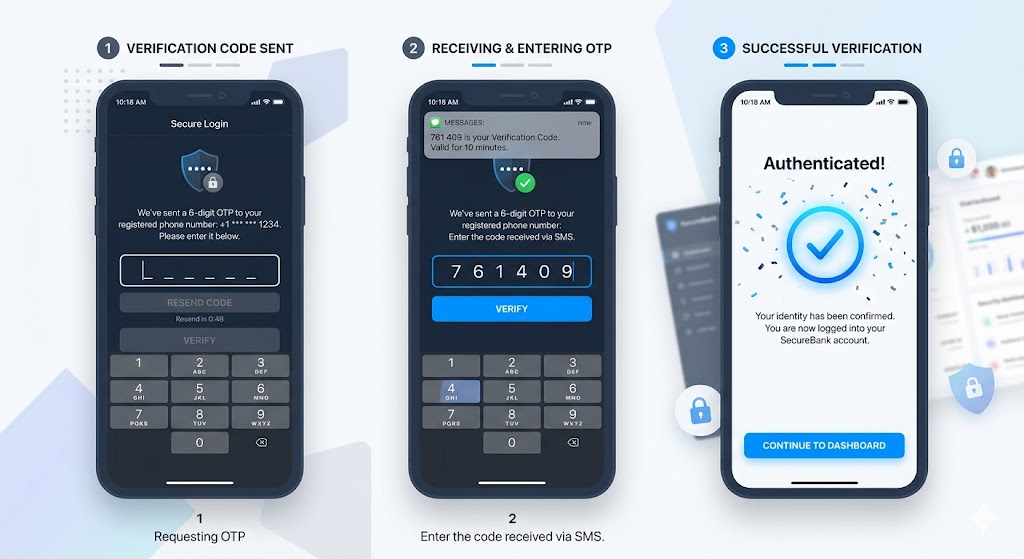
- User enters email or phone number
- Server generates a random one-time code
- Server stores only a hashed representation if possible
- Code is delivered to the user
- User submits the code
- Server verifies correctness, expiry, and single-use status
- Server creates a session or issues tokens
OTP Generation Requirements
Use a cryptographically secure random source. Do not use java.util.Random.
import java.security.SecureRandom;

public class OtpUtil {

    private static final SecureRandom RANDOM = new SecureRandom();

    public static String generateSixDigitOtp() {
        int value = 100000 + RANDOM.nextInt(900000);
        return Integer.toString(value);
    }
}
OTP Validation Controls
- Expire codes quickly, often within 30 seconds to 5 minutes
- Allow only a small number of attempts
- Lock or slow down repeated failures
- Invalidate on successful use
- Correlate request with device and IP when possible
When OTP Works Best
- Login verification for low- to medium-risk systems
- Multi-factor authentication after password or SSO login
- Account recovery as one step in a broader recovery process
When OTP Is Not Enough
OTP, especially over SMS or email, is not the same as phishing-resistant authentication. For high-value administrative access, payments, or privileged developer tooling, passkeys are a much better target state.
OTP as MFA
OTP is often strongest when used as an additional factor rather than the only one.
Example MFA Flow
- User signs in with primary credential or SSO session
- Risk engine or policy requires a second factor
- OTP is delivered or generated by authenticator app
- User submits code
- Server verifies and elevates session assurance
This is especially useful for:
- Finance actions
- Admin dashboards
- Password or email change flows
- Access from new devices or countries
Passkeys and WebAuthn: The Strongest Passwordless Option
If magic links are about convenience, WebAuthn is about cryptographic assurance.
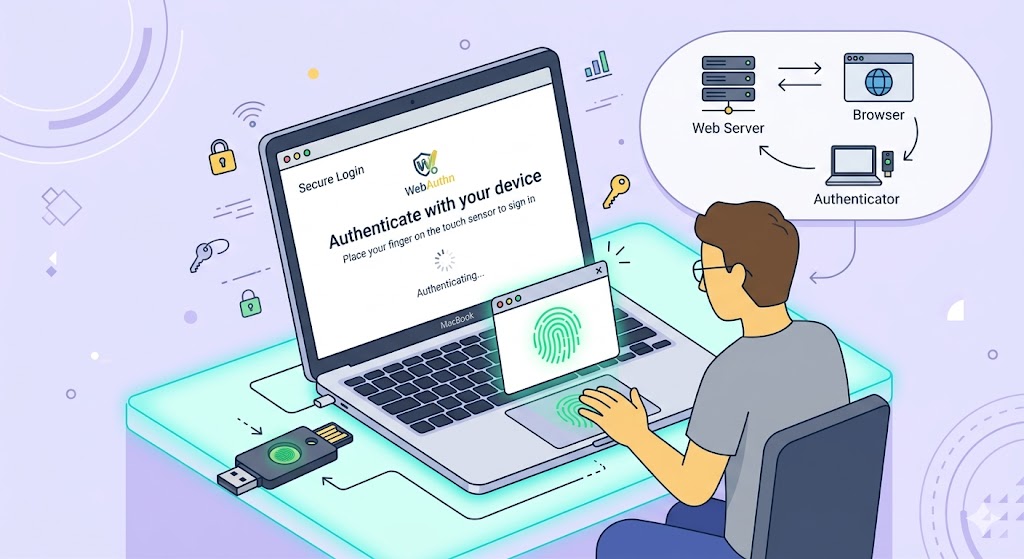
Passkeys and WebAuthn replace shared secrets with public-key cryptography:
- The authenticator creates a key pair
- The private key stays on the device or security key
- The server stores the public key
- During login, the server issues a challenge
- The authenticator signs the challenge
- The server verifies the signature
That design makes WebAuthn highly resistant to phishing and credential replay.
Why It Is Stronger
- No password to steal or reuse
- No shared secret sent over the network
- Authentication is scoped to the relying party origin
- The private key stays under authenticator control
Terminology That Helps
| Term | Meaning |
|---|---|
| Relying Party (RP) | Your application or site |
| Authenticator | Device or key that creates and uses the key pair |
| Credential ID | Identifier for a registered authenticator credential |
| Challenge | Server-generated random value to prevent replay |
WebAuthn Registration Flow
Registration is where the device creates the credential.
- User is already identified or in a trusted enrollment flow
- Server generates challenge and registration options
- Browser calls
navigator.credentials.create() - Authenticator creates key pair and returns attestation data
- Server verifies attestation and stores credential metadata
Minimal Browser Example
async function registerPasskey(optionsFromServer) {
  const credential = await navigator.credentials.create({
    publicKey: optionsFromServer
  });

  return {
    id: credential.id,
    rawId: credential.rawId,
    type: credential.type,
    response: {
      attestationObject: credential.response.attestationObject,
      clientDataJSON: credential.response.clientDataJSON
    }
  };
}
What the Server Should Store
| Field | Why |
|---|---|
| User ID | Link credential to account |
| Credential ID | Identify which authenticator is used later |
| Public key | Verify future assertions |
| Signature counter / metadata | Detect suspicious usage patterns |
| Device or transport metadata | Operational visibility |
WebAuthn Authentication Flow
Authentication is the reverse path.
- User starts login
- Server generates a fresh challenge
- Browser calls
navigator.credentials.get() - Authenticator signs the challenge
- Browser returns assertion to server
- Server verifies signature using stored public key
Minimal Browser Example
async function authenticatePasskey(optionsFromServer) {
  const assertion = await navigator.credentials.get({
    publicKey: optionsFromServer
  });

  return {
    id: assertion.id,
    rawId: assertion.rawId,
    type: assertion.type,
    response: {
      authenticatorData: assertion.response.authenticatorData,
      clientDataJSON: assertion.response.clientDataJSON,
      signature: assertion.response.signature
    }
  };
}
Challenge Endpoint Example in Spring Boot
import org.springframework.web.bind.annotation.PostMapping;
import org.springframework.web.bind.annotation.RequestBody;
import org.springframework.web.bind.annotation.RestController;

import java.security.SecureRandom;
import java.util.Base64;
import java.util.Map;

@RestController
public class WebAuthnChallengeController {

    @PostMapping("/api/webauthn/authenticate/challenge")
    public Map<String, Object> challenge(@RequestBody Map<String, String> request) {
        byte[] challenge = new byte[32];
        new SecureRandom().nextBytes(challenge);

        String encoded = Base64.getUrlEncoder().withoutPadding().encodeToString(challenge);

        return Map.of(
                "challenge", encoded,
                "timeout", 60000
        );
    }
}
The browser example is intentionally minimal. In a production implementation, you should rely on a server-side library such as WebAuthn4J or the Yubico WebAuthn server to handle verification safely.
Recovery Is the Hard Part of Passwordless
Passwordless systems fail operationally when teams focus only on login and forget recovery.
Ask these questions before rollout:
- What happens when the user loses the device?
- Can they register multiple passkeys?
- Is fallback email recovery strong enough?
- Do admins have a controlled recovery process?
- How do you step up verification before changing credentials?
If recovery is weak, attackers will attack recovery instead of login.
Common Mistakes in Passwordless Systems
-
Treating email as inherently secure - Magic links are only as strong as the inbox.
-
Generating tokens or OTPs with weak randomness - Always use
SecureRandom. -
Not enforcing single use - Reusable links and OTPs invite replay.
-
No rate limiting or anomaly detection - Abuse starts at the request endpoint.
-
Logging sensitive tokens and codes - Links, OTPs, and session grants are credentials.
-
Ignoring recovery design - Device loss is guaranteed; plan for it.
-
Calling SMS OTP phishing-resistant - It is better than nothing, but it is not passkey-grade security.
Quick Decision Guide
| Scenario | Best fit |
|---|---|
| Consumer app optimizing for low friction | Magic links or email OTP |
| Medium-risk app needing broad compatibility | Authenticator-app OTP or email OTP |
| Admin access or developer platform | Passkeys / WebAuthn |
| Step-up verification after SSO | OTP or passkey challenge |
| Long-term strategic authentication direction | Passkeys |
What's Next
By this point we have covered users, identity providers, and passwordless login. The next question is what happens when there is no user in the loop at all and services need to trust one another across a distributed system.
In Part 7, we will cover service identity, service-to-service authorization, call-chain security, mTLS, OAuth client credentials, and the trade-offs between application-level and infrastructure-level enforcement.
Did you find this article useful?